
Importing Revit into Unity [Update]
A few weeks ago, I wrote about using the Unity3D game develop engine to import Revit Architecture models. I’ve since upgraded to Unity Pro, opening the doors to some even more powerful features. I really haven’t had a lot of time to spend on this, but I couldn’t resist pulling up this early design iteration, and adding some lights to see how it would look. Find the live updated build HERE. I even stepped out my back door this morning and recorded an audio sample for some contextual ambiance (the sandhill cranes are back!).
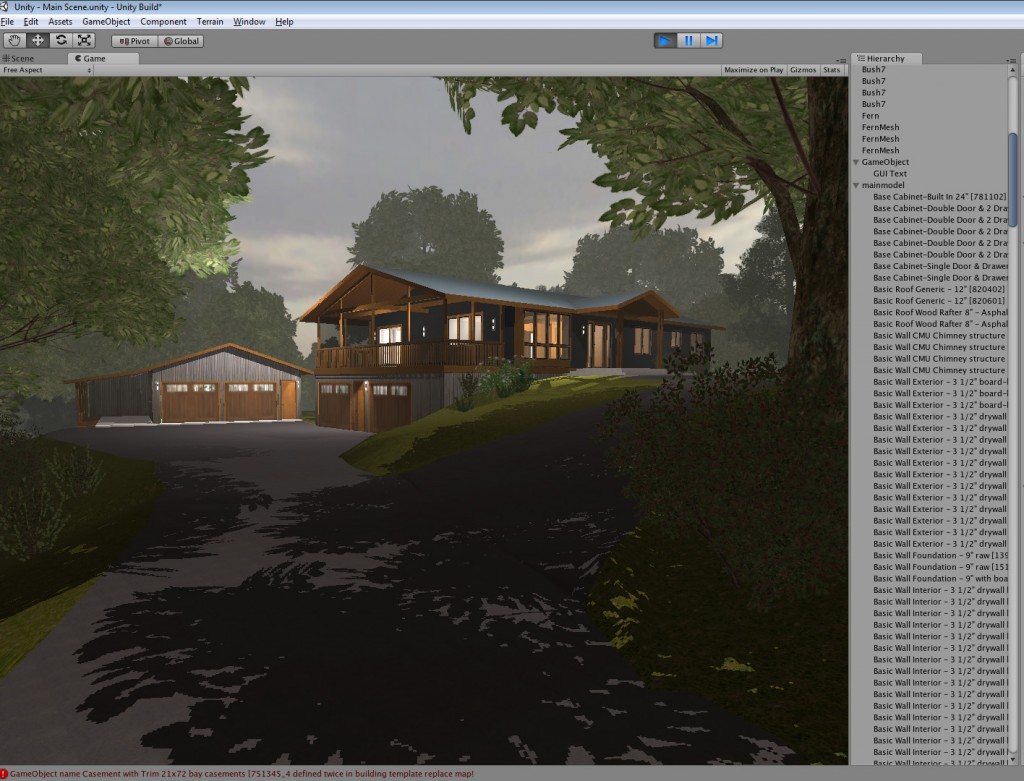
Unity continues to amaze – especially with the new lighting options available, on top of the overall ease of use and simplicity of importing Revit models (or any AEC BIM / modeling app for that matter).
Since my last update, I’ve started contracting on several Unity projects, primarily developed in Maya – which obviously look much better than a model straight out of Revit Architecture, since they’ve been optimized specifically for deployment in a realtime game engine. However, I still think Unity is an amazing compliment to Revit for architectural design visualization. It enables a much more ‘experiential’ design process, where you’re able to test design ideas in a more immersive, realtime environment and at much higher framerates than you can get with draft renders or Revit’s ‘Walk’ tools. I still use pen and trace paper to sketch out schematic design ideas, but when I want to test the idea – I first draft it in Revit to be sure the dimensions will actually work, then switch over to Unity to walk around inside of it and publish it to a website to share with others.
The added benefit of working with Unity is how easy it is to update the model to reflect revisions. Even after materials are applied and lights have been place, changes made in Revit appear instantly upon export.
I will post another update soon with a more advanced design iteration and Unity build!



Awesome job Jon! I have met a growing number of architects using Unity and I am encouraged to see more adopt web3D tech like it. I am navigating through your scene now and it looks great. Well done.
Hey just came across this! Wonderful a few questions for ya. Is Unity3D easy to use? i have taught myself revit and have been designing house and walkthroughs and camera shots through it.
I would definitely give it a try. ‘Easy’ is relative… and it really depends on how patient and persistent you can afford to be with some trial and error.
In a nutshell, this is what you do.. download the free version of Unity. Start a new Project. Export your Revit model as an FBX into the ‘Assets’ folder of your new project. Switch back to Unity… it should now be importing your FBX file automatically. When its done, you’ll see it in your ‘Project’ menu. Drag it into your ‘Scene’ – then select each element and assign materials via the Inspector.. you’ll see empty little material slots – click ‘Select’ in that little box, then find the right texture. You might need to adjust the Tiling numbers to get it to look right.
Select the FBX model in your Project menu and click ‘Generate Colliders’ in the Inspector. Now, expand the ‘Standard Assets’ folder in your Project menu – then expand the ‘Prefabs’ folder and find the ‘First Person Controller’. Drag that into your scene. Use the W, E, and R keys to move, rotate and scale the prefab until you get it to the right place where you want your player to start. If the scale is way off, you might want to adjust the scale on the FBX itself… I often have to increase mine (via the Inspector menu with the FBX selected) by 30 or even 100 times.
Now click ‘Play’ on the top middle.. you should now be able to walk around the scene using arrow keys and mouselook – space bar to jump.
To publish it to a website, go to ‘File -> Build Settings’ – click ‘Add Current’ – then select web player and Build it. When its done, copy the two files it generates into a web hosting space via FTP or whatever… then that URL (yourdomain.com/WebPlayer.html) – or whatever its named – should open the Unity project on a web page. There will be a 3 mb plugin download for first time users, but its generally pretty seamless.
Hope this helps!